Math warm-ups that feel like play.
MyMathLearning.com is an online math learning platform built for middle school classrooms. Students tackle interactive daily warm-ups — multiple choice, drawing, graphing, matching and more — while teachers assign, review, and celebrate progress.

Built for classrooms that still use paper
Two innovative features that bridge paper and screen.
Feedback on handwritten work
Students snap a photo of the math they did on paper and get feedback that helps them find and fix mistakes — no special device required.
Turn a handwritten warm-up into an interactive worksheet
Teachers photograph a paper warm-up and it becomes an online assignment students can complete on any device — ready to assign in seconds.
What students get
Everything a middle schooler needs to build fluency, show their thinking, and stay motivated — in one place.
Interactive warm-ups
Multiple choice, numeric, short explanation, matching, drag-and-drop, drawing, and coordinate graphing — seven ways to show your work.
Progress you can see
Track XP, levels, streaks, and badges. Watch your mastery grow with every warm-up you complete.
My Results & Improvement Plan
See the standardized test results your teacher imported — in plain language — with your own plan for exactly what to practice next.
My Math Journey
An arcade-style progression with worlds to unlock, a rewards shop, and mini-games that turn practice into adventure.
Math Relay races
Join live team races by code, or race class-vs-class for bragging rights. Answer for your team and climb the leaderboard.
Built for classrooms
Join a class with a code, see your assignments, and get feedback from your teacher — all in one workspace.
Safe & private
Teachers only see students in their own classes. No ads, no selling data, kid-friendly by design.
AI tutor that guides, not gives
Stuck on a problem? The AI tutor asks questions that lead you to the answer instead of handing it over. Snap a photo of your handwritten work and get feedback that helps you find and fix mistakes.
Practice anywhere
Warm-ups work on Chromebooks, tablets, and phones. Start a warm-up in class and finish at home — your progress follows you everywhere.
Make it yours
Choose your guide — T. Husky or your own avatar — and unlock workspace themes so your practice space feels like yours.
Spend less time prepping. More time teaching.
MyMathLearning handles the warm-ups, grading, and standards reporting so you can focus on the kids in front of you.
Auto-grading, instantly
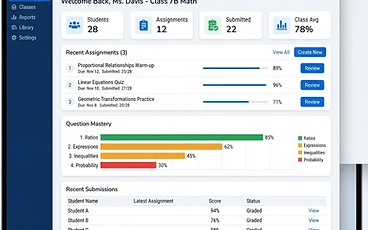
Multiple choice, numeric, matching, and graphing questions grade themselves the moment a student submits. Short-answer and drawing land in your review queue with the student's work attached.
AI warm-ups you approve
Generate a warm-up, quiz, or worksheet from a topic or straight from your pacing calendar. Review every question, edit anything, then publish. Nothing reaches students until you say so.
Standards reports & trends
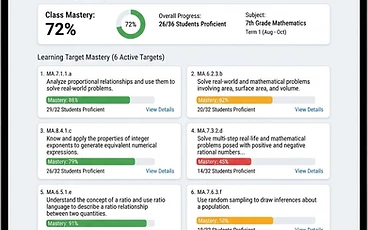
See which standards your class has mastered and where the gaps are, then track mastery over time with trend charts. The students who need support are surfaced automatically, so intervention is one click away.
Import any assessment data
Bring in Star Math, CMAS, Illuminate, i-Ready, or MAP results — a whole-class CSV, a photo of one report, or a typed score. Small-group intervention plans are built from each student's actual results, and every student sees their own improvement plan.
Time you get back
Ready-to-assign warm-ups, instant grading, and one-click answer keys. Reclaim your planning period instead of building worksheets from scratch.
A library of hands-on mini lessons
33 ready-to-teach mini lessons aligned to the Open Up Resources 6–8 curriculum — each launches a unit with a physical, hands-on activity before students touch a screen. Copy, edit, and assign in seconds.
A supply list for hands-on lessons
Every material your hands-on mini lessons call for — gathered into one shopping list you can print or export, with checkboxes to track what's already on the shelf.
Google Classroom & Calendar
Post assignments and announcements straight to Google Classroom, and sync due dates to your Google Calendar. Students join with a code or a CSV roster — whatever fits your workflow.
Pacing calendar
Map your year week by week with a built-in pacing calendar. Generate a warm-up from any week's topic in one click — aligned to your scope and sequence.
Video library
Curated, ad-free YouTube fluency videos sorted by grade and topic — perfect for quick practice, station rotations, or a homework boost.
CMAS-ready calculator
A built-in calculator matches the CMAS calculator policy for grades 6–8, so students practice with the same five-function tool they'll use on Colorado's state test.
Parent dashboard & reports
Parents get their own login to see their child's progress live, plus automatic weekly emails with completed warm-ups, scores, and mastery growth — so home and school stay on the same page.


Grade paper work. Keep the teacher in charge.
Students do math on paper, snap a photo, and get feedback on their work. Teachers review every result and can override anything — the teacher always decides the grade.
Works in any classroom
No one-to-one devices needed for every task. Paper routines stay — students write, photograph, and submit from any device they have.
Free for classrooms, licensed to schools
Core warm-ups, auto-grading, and standards reporting are free for classrooms. Premium AI tools are licensed per school or district — request a quote or a free pilot.
Student data protected
Only the photo, question prompt, and correct answer are sent to the AI provider — no names or IDs. Student work is never used to train AI models. We'll sign your district's data privacy agreement.
Read the work, then teach to the mistake
A whole stack of sheets at once
Photograph up to six pages of student work and analyze them as one set. Answers are checked by the built-in math engine, so grading is consistent — anything the engine can't settle is flagged for you instead of guessed.
See the step that went wrong
Scratch work is transcribed line by line, with the first wrong step highlighted, so you can tell a small slip from a real misunderstanding — and override the reading whenever it's off.
Group students by their mistake
Analyzed work is sorted into small intervention groups that share the same gap, then a reteach mini lesson is written for just that group and assigned to those students. Grouping uses no AI, so it costs nothing to run.
Standards-aligned by design
MyMathLearning is aligned to the Colorado Academic Standards for grades 6–8, with 36 standard codes verified by educators and mapped to warm-ups. When a report says MA.6.1.1.a, it's the real thing.
How it works
Three steps from sign-up to first warm-up.
Create an account
Sign up as a student, teacher, or parent with email or Google.
Join a class
Students enter a join code from their teacher; teachers create a class in seconds.
Start a warm-up
Complete daily warm-ups, earn XP and badges, and watch your skills grow.
What's free, and what's paid
Core teaching and learning are free, forever. Premium only powers the AI generators.
Patent PendingAlways free
- Student practice — all 7 question types, drawing & graphing tools
- Interactive worksheets students complete online or print
- My Math Journey arcade, badges, and Math Relay races
- Shared Library — 33 hands-on mini lessons (Open Up Resources)
- Supply list — every material your hands-on mini lessons need, in one shopping list
- Create classes, roster by code or CSV, and assign work
- Co-teachers — share class access with colleagues
- Google Classroom & Google Calendar integration
- Pacing calendar with weekly warm-up recommendations
- Video library with curated fluency practice
- CMAS-ready calculator practice for Colorado state test prep
- Parent progress reports — weekly emails to families
- Build warm-ups, quizzes, and worksheets by hand
- Review submissions, give feedback, and track progress
- Analyze paper work — up to six sheets at once, with the wrong step highlighted
- Intervention groups built from analyzed work, with a reteach lesson per group
- Standards Insights, mastery trends, and printable progress reports
- Parent dashboard — families log in to see their child's progress
Premium AI tools
Everything in free, plus AI generators.
- AI warm-up, quiz & worksheet generators
- AI answer keys for every generated worksheet
- AI hands-on mini-lesson generator
- AI prerequisite gap diagnostics
- AI question illustration & diagrams
- AI handwriting legend calibration
- AI relay-race question generator
- AI intervention plans for targeted support
- YouTube video curation & channel sync
Licensed per school or district — request pricing or a free pilot.
MyMathLearning is free forever. Support us or join Perks.
Run a pilot with your class
Try MyMathLearning with one class for free. We'll help you set up and measure the results — assignment completion, mastery growth, and time saved. Real numbers from your students speak louder than any feature list.